Blog
Segmenting Your Home Network: A Walkthrough
Why I finally separated my smart home devices from the rest of my network.
A practical look at VLANs, IoT isolation, and improving visibility in a home network environment.
Background
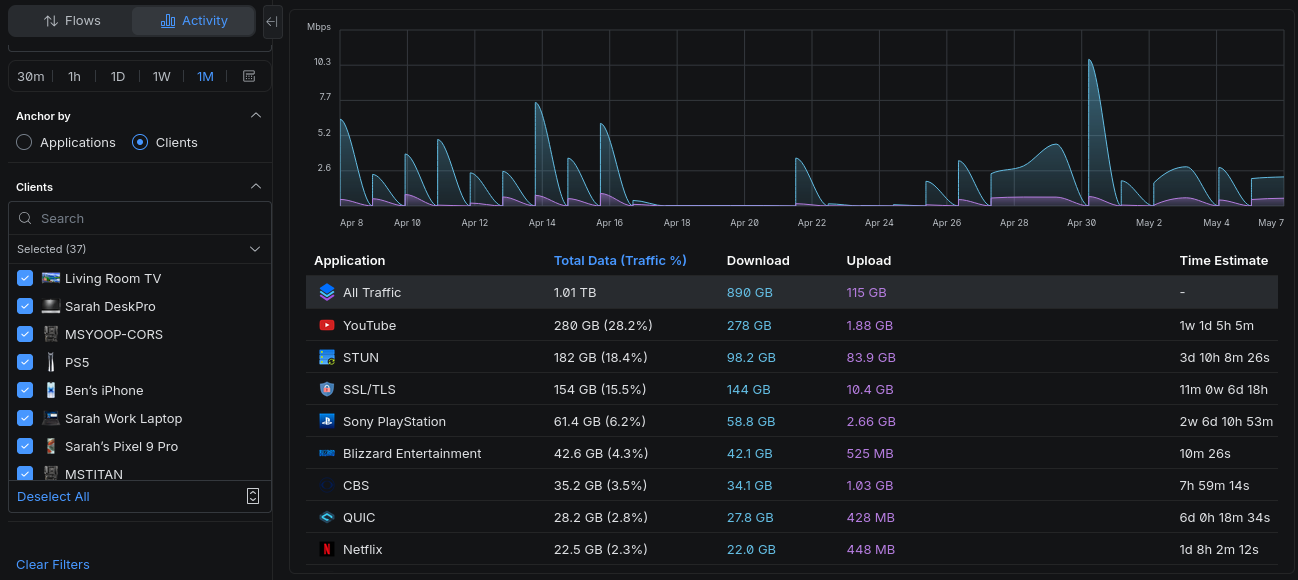
A few months ago, I noticed something odd while reviewing traffic on my home network. I expected my laptop or smart TV to be the busiest device in the house. Instead, the top talker was my IoT thermostat.
That immediately raised a few questions. Why does a thermostat need to generate that much traffic? What exactly is it communicating with all day? And if one device was that noisy, what were my other smart home devices doing behind the scenes?
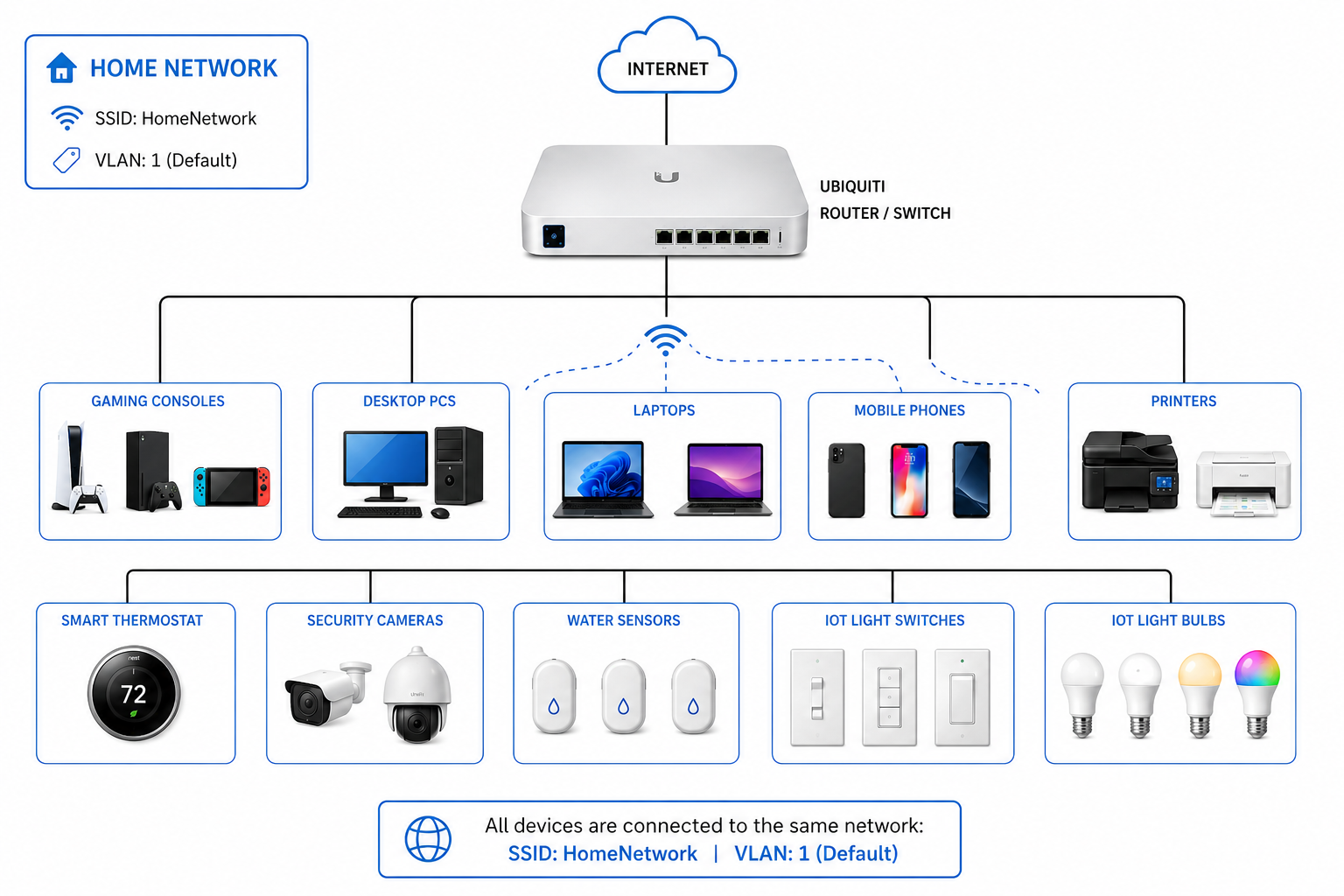
Like many people who work from home, I’ve gradually added more internet-connected devices over the years. Smart TVs, wireless printers, security cameras, thermostats, and streaming devices all ended up sharing the same flat network. It worked fine for a long time, mostly because it was convenient.
As a former network engineer, I knew better.
The reality is that many IoT devices are designed with convenience first and security second. Some receive infrequent updates, some expose unnecessary services, and others communicate constantly with external cloud platforms. Even if the devices themselves are harmless, placing everything on the same network creates unnecessary risk.
If one insecure device is compromised, it may be able to communicate freely with other systems on the network. That includes laptops, phones, storage devices, or anything else sharing the same space.
This finding was what finally pushed me to segment my home network.
Why Network Segmentation Matters
Network segmentation is simply the practice of separating devices into isolated groups instead of placing everything onto one shared network.
In enterprise environments, this is standard practice. Security cameras are separated from workstations. Guest wireless traffic is isolated from internal systems. Servers live on different segments than employee laptops.
At home, most people never think about doing this because consumer networking equipment rarely encouraged it until recently.
With newer equipment becoming more capable, though, it’s now much easier to build a more secure and organized home network.
My Home Network Layout
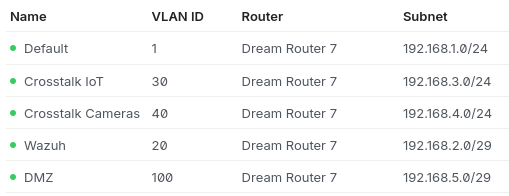
I started by creating several VLANs on my Ubiquiti router.
Each VLAN acts as its own isolated network segment. Devices within one VLAN can be restricted from communicating directly with devices in another unless specific rules are created to allow it.
I separated my devices into a few basic categories:
- Personal devices
- IoT and smart home devices
- Security cameras
- Guest devices
- Testing and lab systems
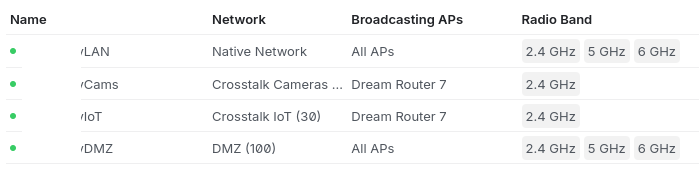
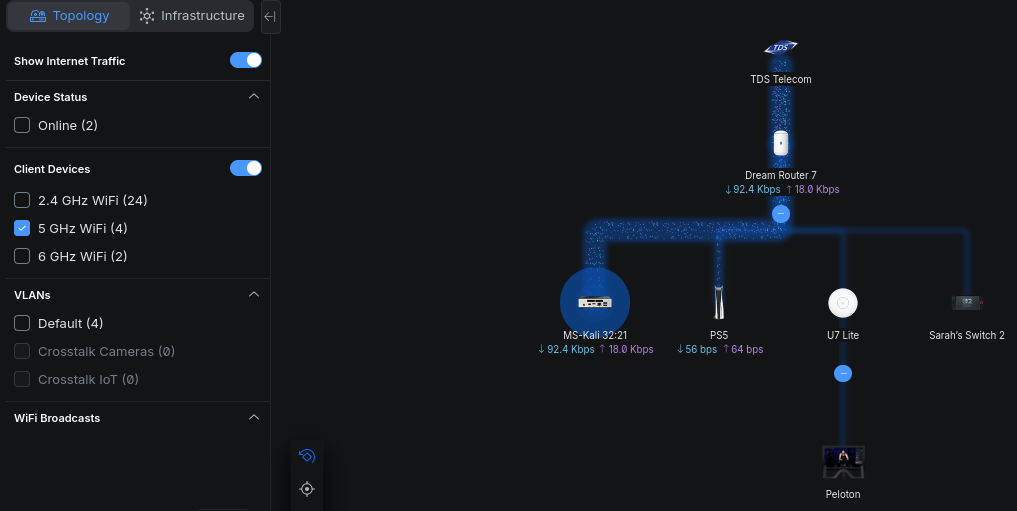
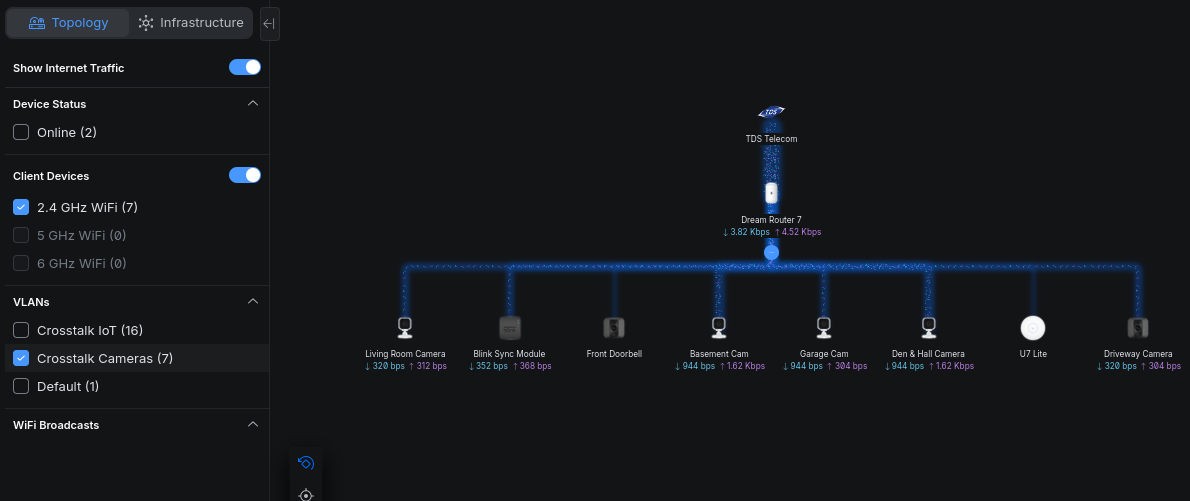
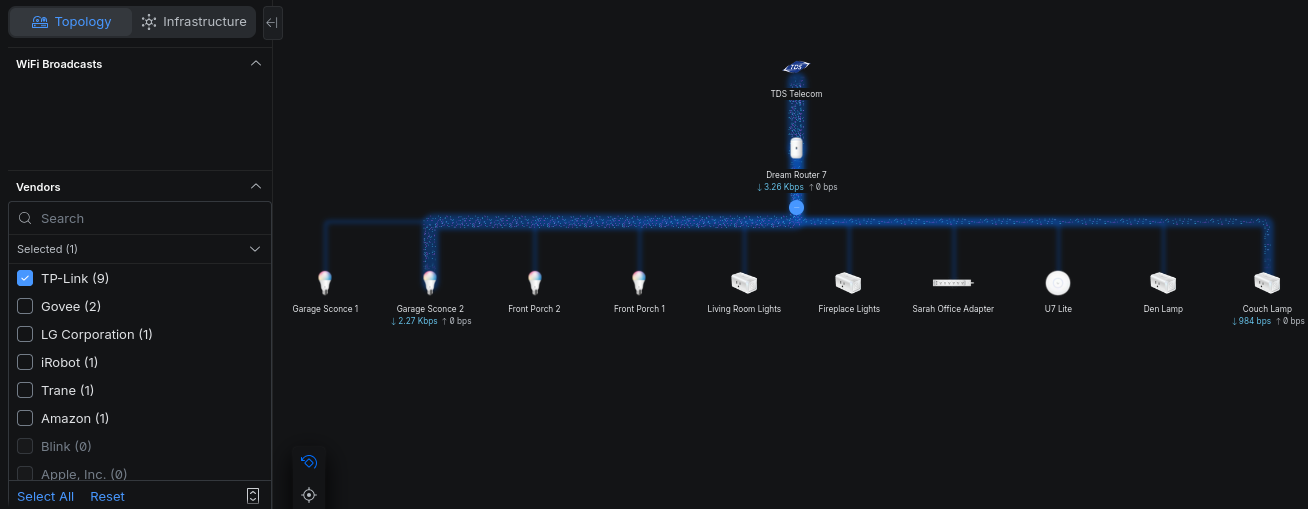
From there, I created separate wireless SSIDs tied to those VLANs. For example, my security cameras connect only to the camera network, while smart home devices connect to a dedicated IoT network. I also disabled the ability for these SSIDs to use other radio bands to further reduce interference and unnecessary traffic between devices. For example, my IoT devices only connect to the 2.4GHz band since most of them do not support 5GHz, while my personal devices use the 5GHz band for better performance.
This immediately made the environment easier to manage. Instead of dozens of unrelated devices sharing the same space, everything now had a defined purpose and location.
The Biggest Benefits
The most obvious improvement was visibility.
Once devices were separated, it became much easier to identify which systems were generating traffic, which devices were talking to each other, and finally identifying unexpected behavior. Troubleshooting also became simpler because I could isolate issues to a specific segment instead of searching across the entire network.
There were also some performance improvements, particularly on the wireless side. Reducing unnecessary broadcast and multicast traffic helped clean up the network and reduced noise between devices.
Most importantly, segmentation improved security.
My smart thermostat no longer needs direct access to my work laptop. My security cameras do not need visibility into personal devices. If one IoT device becomes compromised, segmentation helps limit how far an attacker could move within the network.
That isolation is one of the biggest advantages of a segmented design.
Challenges Along the Way
The process was not entirely seamless.
Some services that rely on device discovery stopped working once devices were separated into different VLANs. Features like screen sharing and media casting often depend on multicast protocols that do not automatically cross network boundaries.
To restore functionality, I had to selectively allow certain traffic between VLANs while still keeping the networks isolated overall.
This is where planning becomes important. Before segmenting your network, it helps to document:
- Which devices need to communicate
- Which services you use daily
- Which systems truly require internet access
That makes it much easier to decide where devices belong and what traffic should be allowed.
Building a Small Home Lab
One additional recommendation is creating a dedicated “lab” or DMZ-style VLAN for testing.
If you experiment with unknown devices, self-hosted applications, or cybersecurity tools, isolating them from your primary network is a smart move. Restricting access between that environment and your trusted devices reduces the risk of accidental exposure or misconfiguration.
Even a simple isolated testing network can be valuable for learning.
Final Thoughts
For years, I delayed segmenting my home network because the existing setup was “good enough.” In reality, I was prioritizing convenience over visibility and security.
After finally making the change, I would not go back.
Even basic segmentation can make a home network easier to manage, easier to troubleshoot, and significantly more secure. You do not need enterprise hardware or a complex setup to get started. A few VLANs and properly organized SSIDs can go a long way.
And if you work in cybersecurity or IT, building a segmented home network is excellent hands-on experience. The same principles used in enterprise environments can be practiced safely at home, which makes it a useful learning platform as well as a practical security improvement.